
In the rapidly evolving landscape of software development, artificial intelligence (AI) assistants are becoming increasingly valuable tools for programmers. These AI collaborators offer a unique blend of vast knowledge and rapid code generation/review capabilities. However, working effectively with an AI assistant on larger projects requires a thoughtful approach. This article outlines strategies for successful collaboration and explores how to simulate features like “Continue in New Chat” to enhance the development process and value that an LLM can provide.

The Challenge of Context
One of the primary challenges when working with AI assistants on software projects is maintaining context. Unlike human team members, AI assistants don’t have persistent memory of your project structure or access to your entire codebase. This limitation necessitates creative solutions to ensure smooth collaboration. Because the LLMs will often re-read the chat and get confused by trying to deal with a large context, keeping the chats small and creating new chats frequently is a good idea. But if you are working on large things, opening a new window loses the important information. There is no “continue in new chat” feature for making a new chat with the important context to be able to work for a long stretch on a particular section of a codebase. There are creative ways to work around this, reducing LLM credit usage, and improving the quality and usefulness of LLMs when working on large projects.
Strategies for Effective Collaboration
1. Project Overview
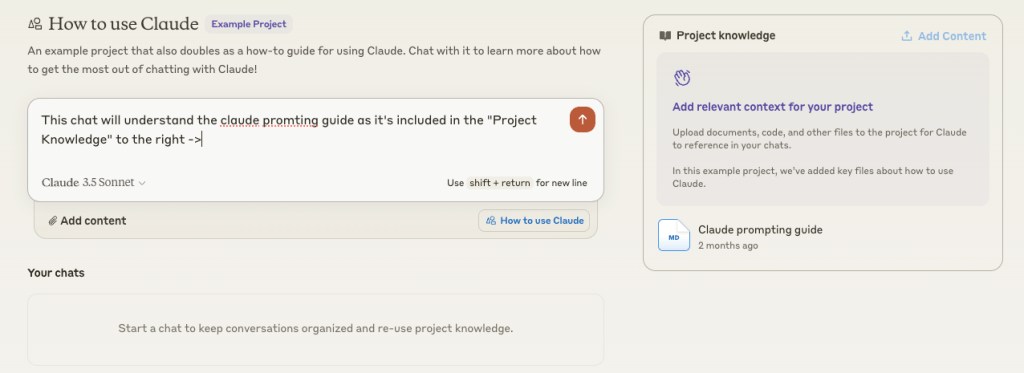
Start by providing a high-level overview of your project structure to the AI assistant. This helps set the stage for more detailed discussions and allows the AI to offer more relevant suggestions. You can create a Claude Project and add the project definition as an artifact that will automatically be included in any new chats.
2. Interface Definitions
Sharing interface definitions is an excellent way to communicate the structure and capabilities of different components in your system. For example:
csharpCopypublic interface IDataService
{
    Task<IEnumerable<Data>> GetDataAsync();
    Task<Data> GetDataByIdAsync(int id);
    Task<bool> SaveDataAsync(Data data);
    Task<bool> DeleteDataAsync(int id);
}
By providing these interfaces, you give the AI assistant a clear understanding of how different parts of your system interact.
3. API Summaries
For parts of your project that don’t have formal interfaces, consider providing brief summaries of available APIs or methods. This gives the AI context without needing to share your entire codebase.
4. Focused Collaboration
When working on a specific component, provide the necessary context for that particular piece. This might include relevant interfaces, API summaries, or explanations of how this component fits into the larger system.
5. Iterative Updates
As your project evolves, update the AI assistant on any significant changes to the project structure or interfaces. This ensures that the AI’s understanding of your project remains current.
The Potential of “Continue CHat” in AI-Assisted Development
It’s possible that the chat gets too long for a task, and you want to create a new chat but carry just enough context with you. A “continue” feature in the context of AI-assisted development could be a game-changer for maintaining context and improving productivity. Until then, we can do a couple things by hand to “Continue” in a new chat window.
“Continue CHat” with Claude
While Claude currently doesn’t have a built-in “continue in new chat” feature, you can simulate some of its benefits:
- Regular Summaries: Periodically summarize the current state of your project and recent changes. You can add/update summaries on a Project in Claude.
- Interface Updates: Keep a running document of your project’s interfaces and share updates back on the project as needed.
- Session Recaps: Start each new session with a brief recap of where you left off if you’re starting a new chat mid-work. And update with any progress made offline.
Conclusion
Collaborating with AI assistants on software projects offers exciting possibilities for increased productivity and creativity. By adopting strategies to maintain context and embracing potential features like “continue,” developers can create a more seamless and effective partnership with their AI collaborators. As these tools continue to evolve, we can look forward to even more integrated and intuitive ways of working together to build amazing software.


 k-xs
k-xs 
Leave a comment